The Gabriella Miller Kids First Data Resource Center (Kids First DRC) is migrating its genomic data to a new storage location. As we near the completion of this transition, this guide explains the technical changes that are taking place and what you need to do to maintain uninterrupted access to Kids First data.
November 2025 Update
The Kids First Data Resource Center has been working for several months on a migration of Kids First genomic data to a new file storage location and new access authentication service. The final step is for our NIH-based program officers to make a series of changes to the datasets within dbGaP to allow approved users access to these files.
The shutdown of the U.S. federal government is preventing us from completing this final step – the program officers who would do this work are furloughed and unable to make the changes necessary to unblock access for Kids First users.
Continue to follow this page for additional updates or reach out to our help inbox support@kidsfirstdrc.org to stay in contact as we resolve this issue and the files become available once more.
What changes are taking place?
Kids First genomic data files are being relocated to a new storage site managed by the National Cancer Institute (NCI). The new location supports long-term storage and will ensure these datasets remain available for secondary research use in the future.
The data files themselves are not changing — you’ll still have access to the same alignments, variants, and gene expression counts. Controlled-tier data will continue to require dbGaP approval on a per-study basis. If you already have an approved dbGaP application, you do not need to resubmit it. All data files will still be available via the Kids First Portal for analysis on CAVATICA.
Existing CAVATICA projects will still be available on the platform. The files loaded within them will still be present and should automatically be refreshed to point toward the new storage location. While we expect no major disruptions for users, errors can occur. Please read the directions below to check your files on CAVATICA and refresh them if you find them to be nonfunctional.
Data Repository Service
When users identify a set of files on the Kids First Portal and click the “Analyze in CAVATICA” button, the underlying Portal software fetches a list of URLs for those files and sends them to your selected CAVATICA project. These URLs are generated via the Global Alliance for Genomics & Health (GA4GH)’s Data Repository Service (DRS). Each URL points to a particular file in its storage location.
DRS is the mechanism which allows controlled-tier Kids First data only to be used by researchers with approved data access requests. When a user interacts with a Kids First file, either running a cloud workflow or attempting to download it, DRS checks whether they are approved to access it before allowing the interaction to proceed.
Each Kids First file now has a new DRS URL associated with its location in the new storage. URLs that reference the old storage location are being made inactive and will no longer function. Files on CAVATICA with old URLs will still be present in your CAVATICA projects, but they will not be able to be used for analysis or download. Think of an old URL like a bookmark to a website that has been taken offline — the bookmark remains, but the site is no longer accessible.
DRS URLs which begin drs://data.kidsfirstdrc.org point to the old copy of the Kids First genomic data. These URLs are being deprecated and will no longer work. The new DRS URLs beginning with drs://nci-crdc.datacommons.io point to the new copy of the Kids First genomic data and will be required to use Kids First data in the future.
You can determine the DRS URL of a file on CAVATICA in two ways.
The first method is by hovering over the server stack icon to the left of the file name in the Files tab on CAVATICA. The DRS URL will appear as a popup.

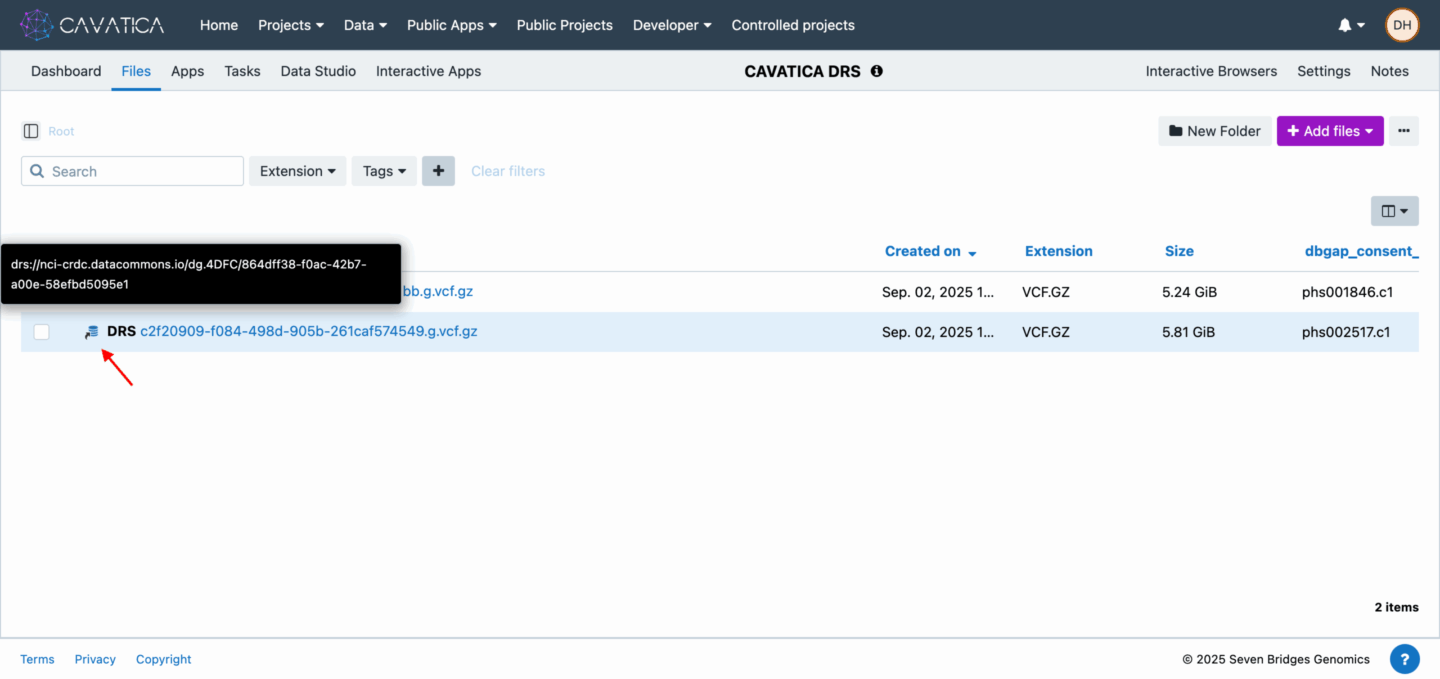
Two different genomic files pushed from the Kids First Portal to the same project on CAVATICA. The first file has an old DRS URL, as identified by hovering over the server stack icon to the left of the file name. This file is present in the project, but it would not be functional if it was used as part of an analysis or download. The second file has a new DRS URL and is able to be incorporated into an analysis.
The second method is by clicking on the individual file in the Files tab on CAVATICA. The DRS URL will appear in a blue box at the top of the screen. It also appears as part of the “access URL” under additional metadata lower on the same page.
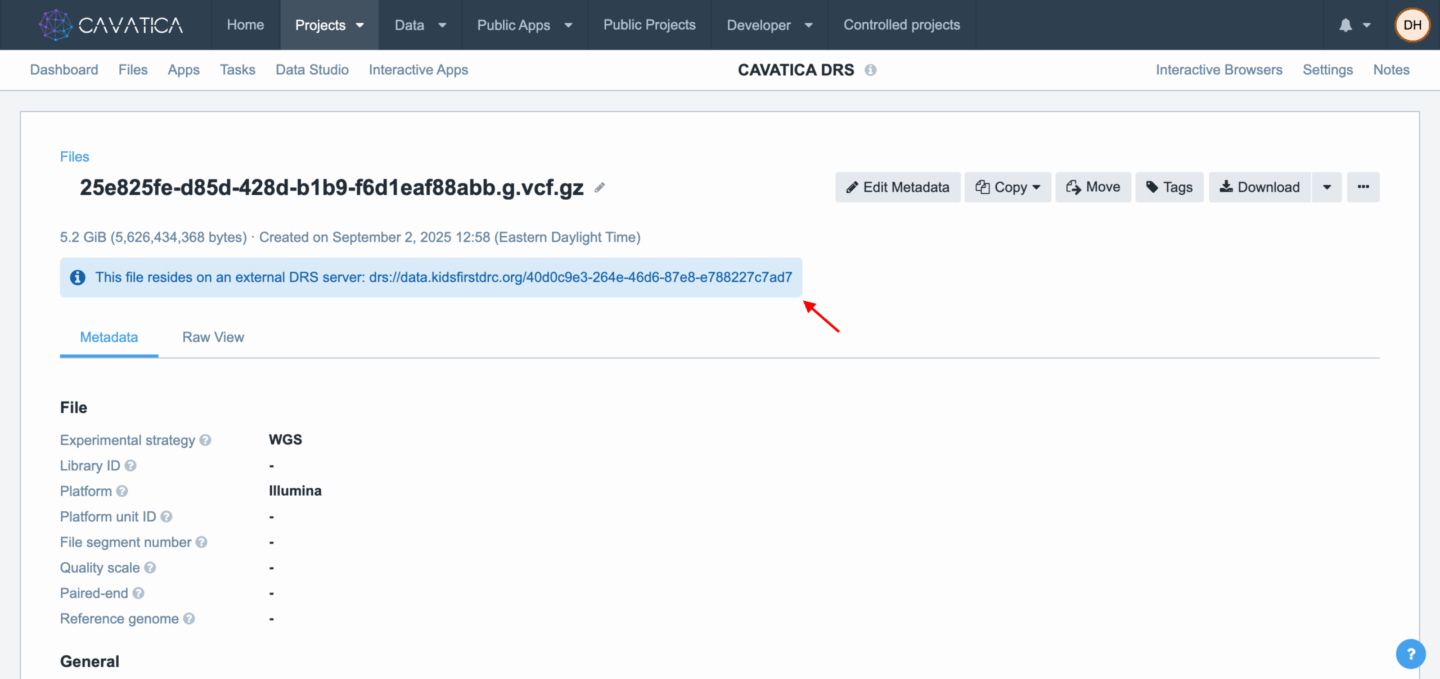
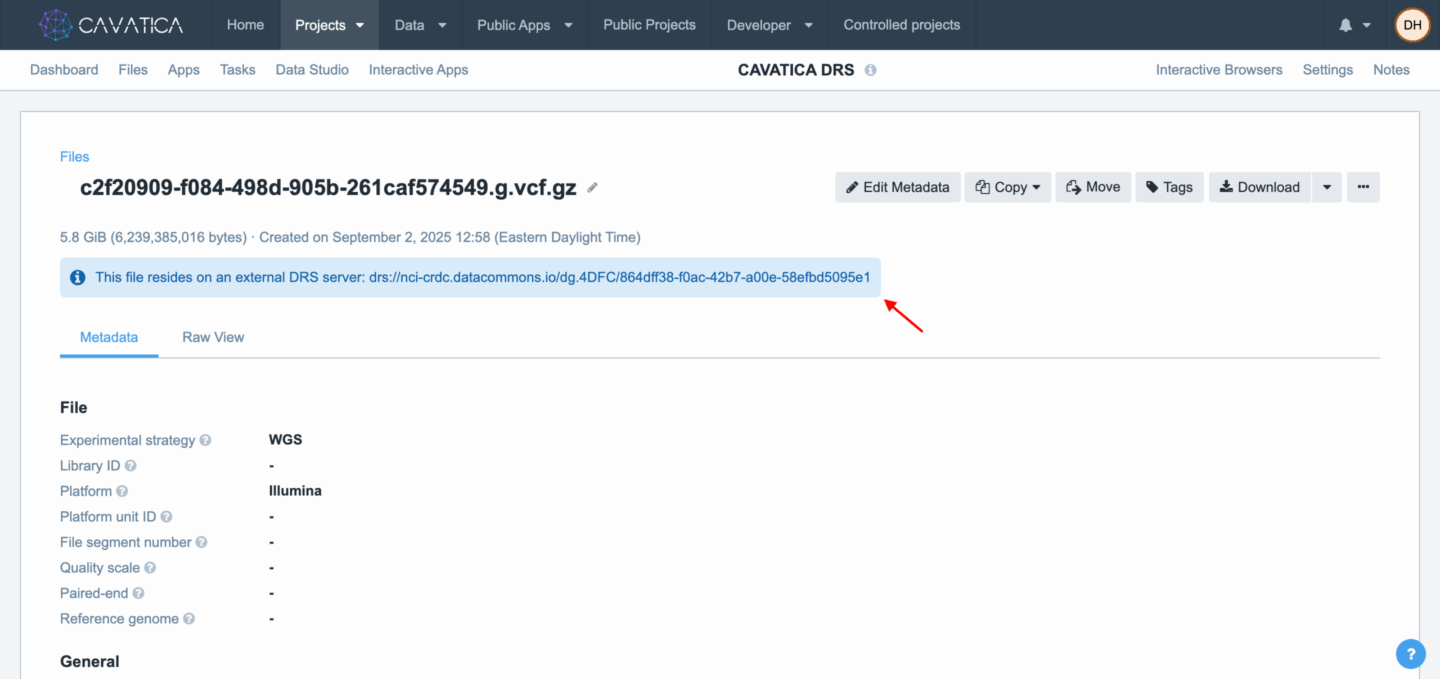
The File Details page for the same two genomic files described above. The first file has an old DRS URL, as identified in the blue box at the top of the screen. Again, this file is present in the project, but it would not be functional if it was used as part of an analysis or download. The second file has a new DRS URL and is able to be incorporated into an analysis.
A general rule is that if you pushed files from the Kids First Portal to CAVATICA prior to September 2025, you were using files with old DRS URLs. The CAVATICA team will be updating the platform to patch these to new DRS URLs so you can continue to use these same files in your same projects.
DRS URL Patching
In early October 2025, CAVATICA will undergo an outage during which the team will be making two upgrades to the platform to support the migration of the files to a new storage location.
- The first of these upgrades will affect how you log into CAVATICA. When you log onto the platform using an NIH eRA Commons ID, it will redirect you to a different page for authentication. Continue to read and agree to the conditions as you did before the outage.
- The second upgrade will patch all files on CAVATICA, replacing files’ old DRS URLs with their new ones. This should allow the same files on CAVATICA to work in analyses without any further user action. If you find that files still have the old DRS URLs (beginning with drs://data.kidsfirstdrc.org), you should be able to push new copies of those files from the Kids First Portal, which will populate in CAVATICA with the new URLs.
Need additional help?
If you have any questions about the data migration or necessary steps to maintain access to Kids First datasets, please reach out to us so that we may help support your research projects.
- Contact us at support@kidsfirstdrc.org at any time with a description of the problems you are facing.
- Visit us during our two monthly support sessions.
- SupportU, on the first Tuesday of each month.
- MasterClass, on the third Thursday of each month.





 Bluesky


